~/blog/networking/docker-outbound-ipv6.md
Outbound IPv6 for Docker containers without restarting them
// tl;dr
My NetBird reverse proxy logged a Docker address for every v6 visitor until I set enable_ipv6 on its own compose network. My app host got outbound v6 separately: an IPv6-only ULA network, attached live with docker network connect and declared external in compose.
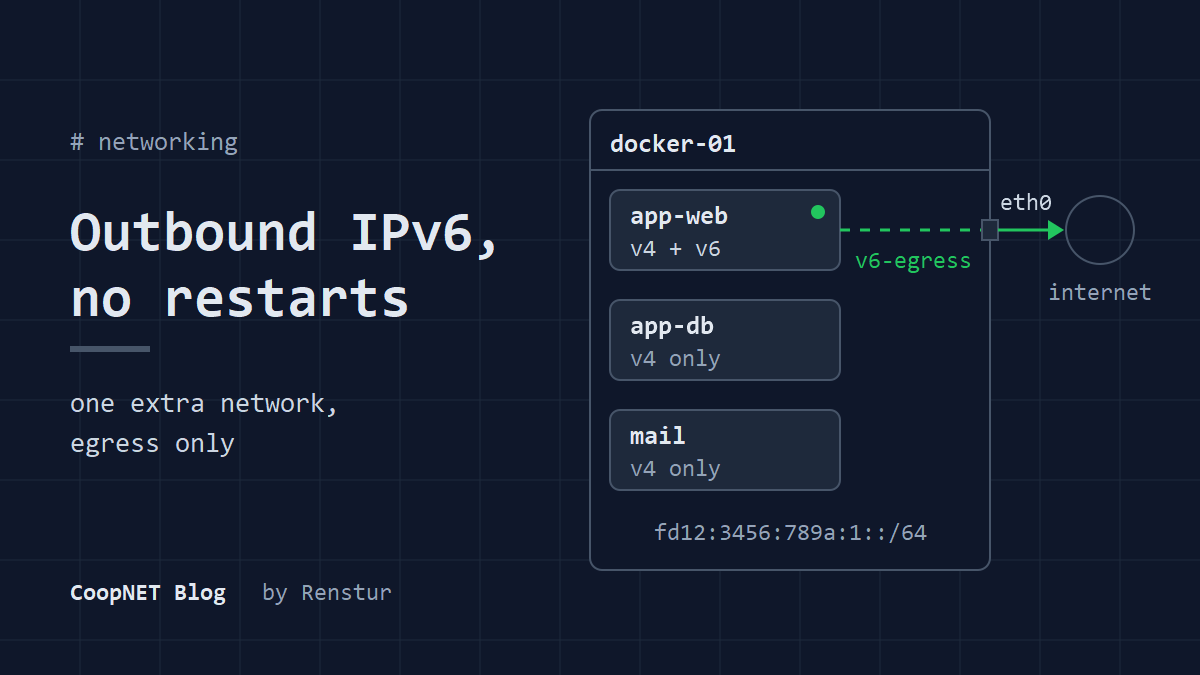
Every app container on my Docker host could reach the internet over IPv4 and nothing else. The host itself had a working global v6 address. On a different host, my NetBird reverse proxy had a related gap: every visitor who came in over IPv6 looked like a Docker address in its logs. Both came down to the same thing. IPv6 in Docker is set per network. One setting on the proxy's compose network fixed the logs. For the app host I wanted IPv6 on the Docker side without restarting anything and without opening any new way in. In June 2026 I got there with one extra network and a docker network connect per container.
docker engine: 29.x
compose: compose spec, external networks
portainer: stacks from on-disk compose files
watchtower: image updates enabled
What I wanted, and what I didn't
The app host already had a global IPv6 address on its uplink. The goal was simple: containers should be able to open connections out over v6. I didn't want any new inbound exposure. No new published ports, and nothing reachable over v6 that wasn't reachable before.
I also didn't want to touch the existing networks. The app containers already sat on their stack's default network with IPv4, and that was fine. Rebuilding that network with IPv6 turned on would have meant recreating every container on it.
So the v6 side went on a separate network, and the containers got a second interface. In my post on splitting one Docker host into network tiers I said the IPv6-only network was its own post. This is it.
First, the proxy logs on the other host
My NetBird reverse proxy runs in Docker on a different host, with its ports published. Clients that reached it over IPv4 showed up in its logs with their own addresses. Clients that arrived on the server's IPv6 range didn't. They all showed up as a Docker address instead, so the v6 half of the log told me nothing about who was connecting.
My understanding, which I haven't tested, is that with no IPv6 inside the container, Docker had to hand those connections over on its own IPv4 side, and the original source got lost on the way.
The fix there was one setting on the proxy stack's own compose network:
networks:
  proxy-net:
    enable_ipv6: true
It's the same setting that comes up in my post on the NetBird proxy and a Docker hairpin. As far as I know, Docker won't switch IPv6 on for a network that already exists. The network has to be recreated, so that stack needed a redeploy. After that, its logs showed real client IPv6 addresses for v6 connections.
The app host was the opposite problem. There I couldn't rebuild networks without recreating every container on them, so it got a separate network attached live.
An IPv6-only network with a ULA prefix
Docker can create a network with no IPv4 at all. I gave it a ULA /64, so the container addresses are private and only the host's global address ever shows up on the internet.
Create the network:
$ docker network create --ipv6 --ipv4=false --subnet fd12:3456:789a:1::/64 v6-egress
Pick your own ULA prefix. The fd range is meant to be generated randomly per site, so don't copy mine.
On my host, Docker masqueraded outbound v6 traffic from that ULA subnet behind the host's global address, the same way it does for IPv4. That relies on ip6tables, which current Docker Engine turns on by default. If you've switched it off in daemon.json, this won't work until you turn it back on.
Turning on forwarding for good
The host has to forward v6 packets between the bridge and the uplink. I put it in a file of its own so it survives a reboot:
net.ipv6.conf.all.forwarding=1
Load it without a reboot:
$ sudo sysctl --system
Attaching running containers
No restarts here. docker network connect adds a network to a running container, and the container gets a new v6 interface on the spot:
$ docker network connect v6-egress app-web
I did that for every container in the app stack, about a dozen of them. Each one kept its IPv4 address on the stack network and picked up a second address from the ULA range.
Then I took a few back off. The database and Redis containers don't need to reach the internet, so they don't get a route to it:
$ docker network disconnect v6-egress app-db
$ docker network disconnect v6-egress app-redis
Check what a container ended up with:
$ docker exec app-web ip -6 addr
$ docker exec app-web ip -6 route
You want an address from your ULA prefix and a default route through the network's gateway. To test egress, use whatever the image ships with. curl -6 or wget -6 against any site that answers over v6 will do. Plenty of slim images have neither, so test from one that does.
The container I left off
The mail container stayed IPv4 only, on purpose.
If it had a v6 route, outbound mail could leave from the host's global v6 address. Receiving servers check that address. Without a matching reverse DNS record and an SPF record that covers it, that mail is a lot more likely to be rejected or filed as spam.
So the mail server waits until the v6 address has rDNS and is in SPF. Until then it sends over IPv4, where both are already set up.
If you run mail in a container, leave it off this network until you've done the same.
What survives, and what doesn't
The attachments held up better than I expected. They survived:
- a host reboot
- a Docker daemon restart
- Watchtower pulling new images and recreating containers
Every time Watchtower recreated a container, the second interface came back with it.
A stack redeploy is different. Redeploying a stack from Portainer rebuilds the containers from the compose file. The compose file doesn't know about v6-egress, so the new containers come up without it. No error. The v6 interface is just gone.
Anything attached by hand only lasts until the next redeploy.
Making it permanent in compose
The fix is to put the network in each service that should have it. The network already exists, so compose should treat it as external and not try to create it:
services:
  web:
    image: example/web:latest
    networks:
      - default
      - v6-egress

networks:
  v6-egress:
    external: true
Keep default in the list. Once you name networks on a service, compose only attaches the ones you list. Drop default and the container is cut off from the rest of its stack.
Leave the database, Redis and mail services alone. They stay off it.
Then redeploy the stack. This time the redeploy is what adds the network, so the problem goes away instead of coming back.
On my host, Portainer's stack editor reads the compose file from disk, so editing the file directly and redeploying from Portainer stuck. If your Portainer keeps the stack in its own database instead, make the edit in the Portainer editor or it'll get overwritten.
What I saw and what I didn't check
Observed on the app host, Docker Engine 29.x, June 2026:
- outbound v6 from the ULA subnet left NATed behind the host's global address
- hand attachments survived a reboot, a daemon restart and Watchtower recreates
- a Portainer stack redeploy dropped them without an error
Observed on the proxy host:
- after
enable_ipv6: trueon its compose network, the NetBird reverse proxy logged real client IPv6 addresses for v6 connections, where before it logged a Docker address
Not checked: which Docker component rewrote the source address on inbound v6 before the proxy's network had IPv6, which Engine release added --ipv4=false or made ip6tables the default, and whether Docker documents the ULA masquerade or I just got it. I also didn't read Watchtower's code to see how it carries networks over. I only watched it happen.
What I'd tell myself
Put the network in compose first and attach by hand second. The live attach was nice because nothing restarted. But it left me with a setup that only half existed on disk, and the next redeploy would have taken it away without saying anything.
$ ./ask --help
Stuck on something similar? Ask below and I'll try to help you work through it. It helps to include:
- --running hardware, OS, versions
- --tried what you've already tried
- --error the exact message, word for word
Comments are public, so leave out passwords, keys and public IP addresses.