~/blog/proxmox-storage/proxmox-zfs-pool-layout.md
How I laid out ZFS pools on a Proxmox host
// tl;dr
I picked mirrors for every pool on my Proxmox host because rebuild time and growing by two disks matter more than RAIDZ1's extra space. Importing an old pool mounted a dataset over /var/lib/vz and hid a running VM's disk. Run zpool import -N and check mountpoints first.
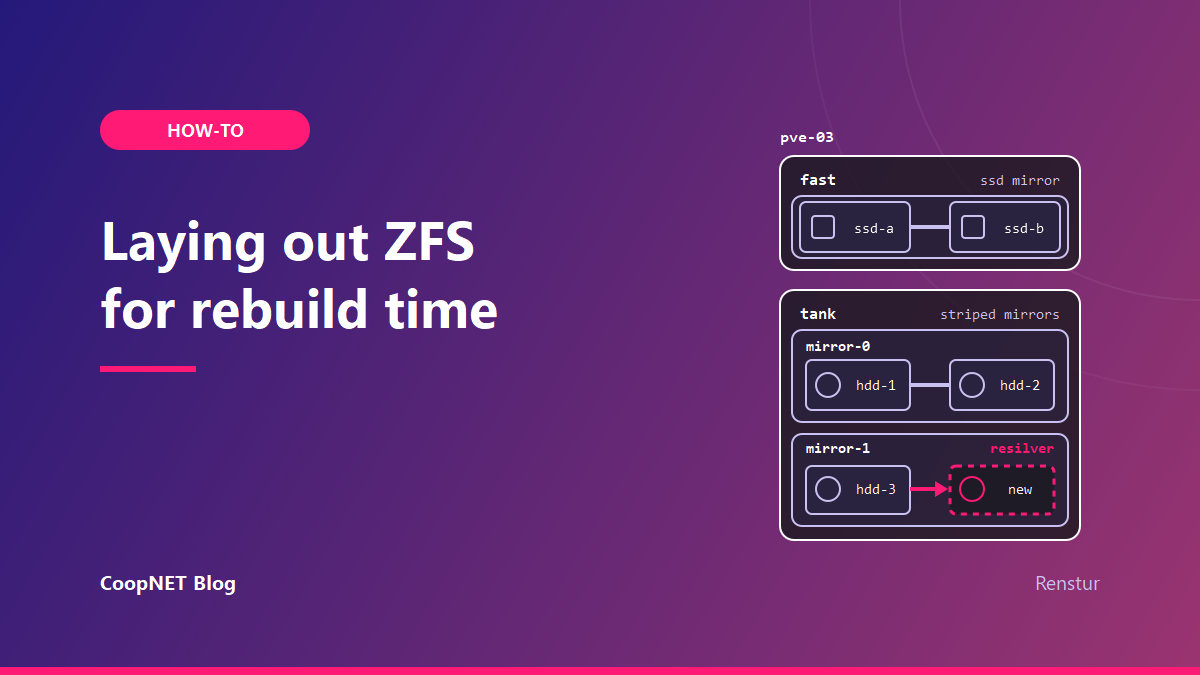
In September I imported a second ZFS pool on one of my Proxmox hosts, and a running VM's disk disappeared from under its own path. The VM kept running. Its next boot would have used a stale copy.
That trap is near the end. Most of this post is how the disks on that box are laid out, and why mirrors make sense for every pool on it.
The disks and where they went
The host has six disks:
| Disks | Layout | Usable |
|---|---|---|
| 2 x 240 GB SATA SSD | one mirror | about 194 GB |
| 4 x 2 TB 7200 rpm SATA | two mirrors, striped | about 3.6 TB |
In this post the SSD pool is fast and the HDD pool is tank. The host is pve-03. None of those are the real names.
The SSD mirror sits on partitions next to the OS install, so the host boots from the same two drives. The HDD pool is four disks set up as two mirrored pairs, with ZFS striping writes across both pairs. If you've used hardware RAID, that's the RAID10 shape.
My rule for the SSD pool is short. It's for the host itself and for the few workloads that really need SSD speed. Everything else lives on spinning disks on purpose, even when there's room on the SSDs. Some guests stay on tank deliberately, and nobody gets to "helpfully" move them.
Capacity is the wrong first question
Four 2 TB disks can give you very different pools:
| Layout | Usable (roughly) | Survives |
|---|---|---|
| one RAIDZ1 vdev | about 6 TB | any one disk |
| one RAIDZ2 vdev | about 4 TB | any two disks |
| two mirrors, striped | about 4 TB | one disk per pair |
Raw numbers make RAIDZ1 look like the obvious pick. Two extra terabytes, for free.
Two other questions matter more. How long is the pool exposed when a disk dies? And how do you make it bigger later?
Rebuild time decides how long you're exposed
When a disk fails and you replace it, ZFS resilvers the new one. Until that finishes, the vdev has lost some or all of its redundancy.
With a mirror, the resilver reads from the one surviving partner and writes to the new disk. The other pair keeps working as normal and isn't involved.
With RAIDZ, rebuilding the missing disk means reading from every remaining disk in the vdev. All of them work hard for the whole resilver, and on a RAIDZ1 one more failure in that window loses the pool.
Larger disks make it worse. The resilver time grows with the data, and the disks doing the reading are usually the same age as the one that just died.
For four disks, mirrors keep the rebuild short and keep the stress on one disk. That's the case for giving up the extra 2 TB.
The tradeoff is real, though. A striped mirror survives two failures only if they land in different pairs. Lose both disks in one pair and the pool is gone. RAIDZ2 survives any two. If a box is far away and replacement disks take days to arrive, that changes the answer.
Growing the pool later
This is the other half of the decision.
A ZFS pool grows by adding top level vdevs. With mirrors, the next step is buying two more disks and adding them as a third pair. The new pair matches the old ones, and the layout stays consistent.
zpool add tank mirror /dev/disk/by-id/<disk-5> /dev/disk/by-id/<disk-6>
Check the device list twice before running that. zpool add isn't something you casually undo.
Here's how to do that check. List the disks by their stable IDs, then see what each one is and whether anything already lives on it:
ls -l /dev/disk/by-id/ | grep -v part
lsblk -o NAME,SIZE,MODEL,SERIAL,MOUNTPOINT
zpool status tank
The by-id names point at short names like sdc and sdd. Find those in the lsblk output and make sure the size and serial match the two new disks. They shouldn't have partitions or mountpoints under them, and neither should appear in zpool status, which lists every disk already in the pool.
Then let ZFS show you the result before it commits to anything. The -n flag prints the layout the pool would have without adding the disks:
zpool add -n tank mirror /dev/disk/by-id/<disk-5> /dev/disk/by-id/<disk-6>
The output should show a third mirror next to the two already there. If it does, run the same command without -n.
RAIDZ used to be stuck at the width you created it with. Newer OpenZFS can add one disk at a time to an existing RAIDZ vdev. Data already on the vdev keeps its old parity ratio until it's rewritten, so the space you gain on paper and the space you see aren't the same right away.
A RAIDZ vdev's parity level is fixed once it's created. A RAIDZ1 vdev stays RAIDZ1. Whatever you pick on day one is what you live with, which is a bad reason to pick from the capacity column alone.
For a VM host there's one more point for mirrors. VM disks do lots of small random reads and writes, and a pool of several mirror vdevs generally handles that better than one wide RAIDZ vdev of the same disks.
Two storage entries on one SSD pool
In Proxmox, the SSD pool shows up twice:
| Proxmox storage | Type | What it holds |
|---|---|---|
local |
directory, /var/lib/vz |
ISOs and disk images as files |
| a zfspool entry | zfspool | VM disks as zvols |
Both draw from the same 194 GB. That looks like double booking in the storage view, but it's the same shape a stock Proxmox install on ZFS gives you with local and local-zfs. I kept it on purpose.
The HDD pool has a directory storage on its own dataset for ISOs, templates and other bulk files.
The dataset that hid a running VM's disk
The box came with a second pool from its original install. Inside it was a leftover dataset with its mountpoint set to /var/lib/vz. That pool hadn't been imported yet, so the dataset was dormant. I imported the pool, ZFS mounted every dataset it had, and this one landed right on top of the real /var/lib/vz directory.
One VM's disk lived in that directory. The VM didn't notice. QEMU already had the file open, so it kept reading and writing the real disk through its open file descriptor. But the path now pointed at an old copy inside the new dataset.
Nothing errored.
The next time that VM started, Proxmox would have opened the path and booted the stale disk. Whatever had changed since that copy was made would just be gone, with no warning at boot.
I destroyed the leftover dataset once I was sure what it was.
Checking mountpoints before you import
Before importing a pool you didn't build yourself, see what it is first. With no arguments, zpool import lists pools it could import without importing them:
zpool import
Then import it without mounting anything, and read every dataset's mountpoint:
zpool import -N <pool>
zfs get -r mountpoint <pool>
Anything pointing at a path the host already uses gets fixed or destroyed before the first mount.
Proving which file a VM is really using
To catch a shadowed disk on a running VM, compare the file the path resolves to with the file QEMU has open. Find the QEMU process for the VM, then its open disk file:
ls -l /proc/<qemu-pid>/fd/ | grep vm-<vmid>
stat -L /var/lib/vz/images/<vmid>/vm-<vmid>-disk-0.qcow2
stat -L /proc/<qemu-pid>/fd/<n>
Use stat -L. Plain stat on the /proc entry reports the symlink itself, which is 64 bytes, and tells you nothing about the target. If the device and inode numbers from the two stat -L calls differ, the path and the running VM disagree.
What I changed afterwards
/var/lib/vz is now its own dataset on the SSD pool, rather than a plain directory on the root filesystem.
The local storage also has is_mountpoint set:
dir: local
        path /var/lib/vz
        is_mountpoint 1
With that set, Proxmox checks that something is actually mounted there before using it. If the pool ever fails to import at boot, Proxmox refuses to write into the empty directory underneath instead of quietly filling the root disk.
Both pools are in /etc/zfs/zpool.cache, so they import at boot. One thing looked wrong but wasn't:
$ zpool get cachefile fast
NAME  PROPERTY   VALUE      SOURCE
fast  cachefile  -          default
The - means the pool uses the default cache file. It doesn't mean it's missing from it.
I also moved the VM's disk off the directory storage onto the SSD zvol storage with qm move-disk, while it ran. It took about five seconds and the QEMU process never restarted.
What I checked and what I didn't
Seen on the host in September 2026. Current Proxmox VE is 9.2.
- the shadowing: path and running process pointed at different files
- the mountpoint on the leftover dataset, before destroying it
- the live disk move, same QEMU process before and after
is_mountpointset, and both pools in the cache file
Not measured: resilver times on this hardware. The rebuild argument above comes from how mirrors and RAIDZ resilver, not from a disk I've replaced on this box.
What I'd tell myself
The capacity column was the least useful one in that table. The failure I'm worried about and the next two disks I'd buy say more about the layout. And before importing a pool I didn't build, zfs get -r mountpoint first, read to the bottom of the list.
Names and addresses are changed. Everything else happened.
$ ./ask --help
Stuck on something similar? Ask below and I'll try to help you work through it. It helps to include:
- --running hardware, OS, versions
- --tried what you've already tried
- --error the exact message, word for word
Comments are public, so leave out passwords, keys and public IP addresses.