~/blog/services/ghost-6-activitypub-analytics-self-hosted.md
Selfhosting Ghost 6 social web and analytics behind a reverse proxy
// tl;dr
I added Ghost 6's social web and web analytics to my selfhosted Ghost with a small Caddy in front that routes ActivityPub and analytics paths to their own containers. Make Ghost wait for a healthy ActivityPub and strip trailing slashes on ActivityPub paths, or the Network page breaks.
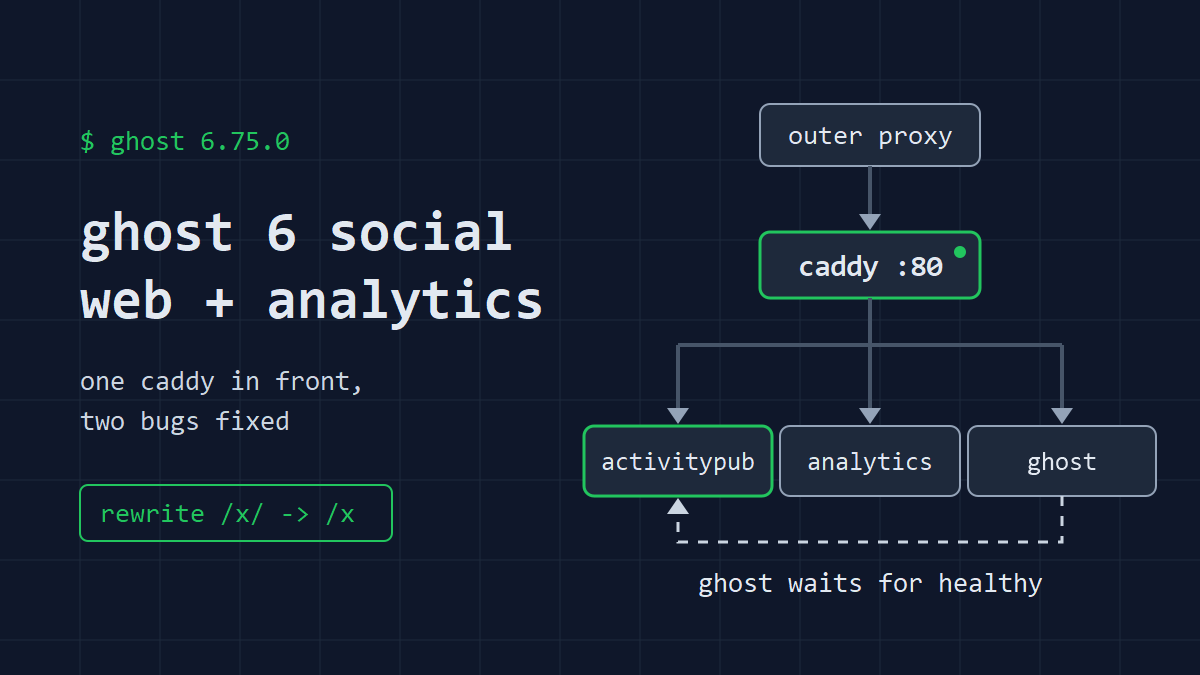
I wanted two things from Ghost 6 that the plain ghost plus MySQL compose file doesn't give you. The social web, so the blog has a fediverse account people can follow, and the built in web analytics. Both work selfhosted. Both also need extra containers and a little routing in front of Ghost. On the way I hit two bugs that made the Network page in Ghost Admin look broken while everything underneath was fine.
What the stack looks like
Before this, the setup was two containers: ghost and ghost-db. My outer reverse proxy (the NetBird proxy, same one from the Plex post) pointed straight at Ghost.
After, it's five services plus one that runs once and exits:
ghost, the blog itselfghost-db, MySQL 8.0, now holding a second database for ActivityPubcaddy, a small front door that owns the port the outer proxy targetsactivitypub, Ghost's ActivityPub server, plusactivitypub-migrate, which runs its database migrations and stopstraffic-analytics, which takes page hits from the tracker script and forwards them to the analytics store
The outer proxy target didn't change. Caddy took over the port Ghost used to answer on, and Ghost moved to expose only, so nothing outside the compose network reaches it directly.
One thing to know going in. The analytics store isn't selfhosted. Ghost's web analytics write to Tinybird, a hosted service. You run the small traffic-analytics container yourself, but the events land in a Tinybird workspace. I was fine with that for a blog. If you aren't, stop at the social web half.
The social web half has a shortcut of its own. A fresh Ghost 6 install uses Ghost(Pro)'s hosted ActivityPub service by default. It's free for selfhosters up to 2,000 followers, 2,000 following and 100 interactions a day. I run it myself, so here ActivityPub is its own container.
I pinned nearly every version to what TryGhost's ghost-docker repo pins instead of picking my own. That repo is the reference compose setup for selfhosting Ghost 6, and Ghost's own components move in step with it. When traffic-analytics had a newer release than the one upstream pinned, I still went with upstream.
ghost: 6.75.0
mysql: 8.0
caddy: 2.11.9-alpine
activitypub: 1.2.16
traffic-analytics: 1.0.521
The Caddy front door
Caddy does no TLS here. The outer proxy terminates HTTPS, so Caddy listens on plain port 80 inside the stack and only routes by path. Three groups of paths go somewhere other than Ghost:
/.ghost/activitypub/and everything under it, plus/.well-known/webfingerand/.well-known/nodeinfo, go to ActivityPub on 8080- anything matching
/.ghost/analyticsgets rewritten to the part after it and goes totraffic-analyticson 3000 - everything else goes to Ghost on 2368
Mine looks roughly like this:
{
	auto_https off
	admin off
	servers {
		trusted_proxies static private_ranges 100.64.0.0/10
	}
}

:80 {
	@ap_trailing path_regexp ap_trailing ^(/\.ghost/activitypub/.+)/$
	rewrite @ap_trailing {re.ap_trailing.1}?{query}

	@activitypub path /.ghost/activitypub/* /.well-known/webfinger /.well-known/nodeinfo
	reverse_proxy @activitypub activitypub:8080

	@analytics path_regexp analytics ^(.*)/\.ghost/analytics(.*)$
	handle @analytics {
		rewrite * {re.analytics.2}
		reverse_proxy traffic-analytics:3000
	}

	reverse_proxy ghost:2368
}
Two lines in there matter more than they look.
The trusted_proxies line is what keeps Ghost from looping on redirects. Ghost's url setting is https, and when a request shows up that Ghost thinks is plain http, it redirects to https. The outer proxy sends X-Forwarded-Proto: https, but Caddy only passes that header through from addresses it trusts. My outer proxy reaches the stack from the 100.64.0.0/10 range, which isn't in private_ranges, so I add it. Leave it out and every page bounces forever.
admin off means Caddy has no admin API. That's fine for a container that never changes at runtime, but it also means caddy reload won't work. After editing the Caddyfile, I restart the container:
$ docker restart ghost-caddy
ghost-caddy
The ap_trailing rewrite at the top is the fix for the second bug. More on that below.
Bug one: Ghost only checks for ActivityPub once
After the first compose up, the Network page in Ghost Admin said "Loading interrupted". Sometimes it said "page not found". ActivityPub was running. Its logs said No site found and SITE_MISSING, which reads like ActivityPub lost the plot, but the cause was on the Ghost side.
Ghost registers itself with ActivityPub once, when Ghost boots. If ActivityPub isn't listening yet, Ghost logs it and moves on:
$ docker compose logs ghost | grep -i activitypub
ghost  | ActivityPub is unavailable (502) - skipping webhook setup
And it never tries again.
Ghost started faster than ActivityPub, so Ghost asked, got a 502 from Caddy, shrugged, and ActivityPub was left with no site registered.
The quick fix is restarting Ghost once ActivityPub is up. The real fix is making compose wait. Give ActivityPub a healthcheck that only passes once port 8080 accepts connections, and make Ghost depend on it being healthy, not just started. Upstream's compose file only waits for ActivityPub to start and gives it no healthcheck, so this part you add yourself. Mine is a plain TCP check. One way to write it that only needs node, which the ActivityPub image already has:
services:
  activitypub:
    # image: copy the pinned line from TryGhost/ghost-docker
    healthcheck:
      test: ["CMD", "node", "-e", "require('net').connect(8080,'127.0.0.1').on('connect',()=>process.exit(0)).on('error',()=>process.exit(1))"]
      interval: 10s
      timeout: 5s
      retries: 12

  ghost:
    # image: copy the pinned line from TryGhost/ghost-docker
    expose:
      - "2368"
    depends_on:
      ghost-db:
        condition: service_healthy
      activitypub:
        condition: service_healthy
With that in place, a full restart comes up in the right order every time. The migrate container shows as exited. That's expected. It runs on every compose up and stops when the migrations are done:
$ docker compose ps -a --format "table {{.Name}}\t{{.Status}}"
NAME                         STATUS
ghost                        Up 2 minutes
ghost-db                     Up 3 minutes (healthy)
ghost-caddy                  Up 3 minutes
ghost-activitypub            Up 3 minutes (healthy)
ghost-activitypub-migrate    Exited (0) 3 minutes ago
ghost-traffic-analytics      Up 3 minutes
Bug two: the trailing slash retry loop
With registration fixed, the Network page still said "page not found". This time the Caddy log had the answer, and a lot of it. Around 1,500 302 responses, all for ActivityPub paths, all in a tight loop.
ActivityPub redirects any path with a trailing slash to the same path without one. So /.ghost/activitypub/something/ gets a 302 to /.ghost/activitypub/something. Ghost Admin calls every one of those endpoints with the trailing slash. Admin treated the redirect as a failure, retried, and round it went.
The fix is stripping the slash before the request reaches ActivityPub. That's the ap_trailing block at the top of the Caddyfile: a named regex matcher that captures everything under /.ghost/activitypub/ minus the final slash, and a rewrite to that capture with the query string kept. Caddy runs rewrite before reverse_proxy, so ActivityPub only ever sees the form it wants and never sends the redirect.
After a Caddy restart, ActivityPub traffic in the log went to all 200 and 202 responses. The Network page loaded.
How sure I am: the 302 count, the slash stripping on the ActivityPub side and Admin always sending the slash are all in the logs. That Admin's retry is what turned it into a loop is my read of the pattern, not something I traced in the browser. The rewrite fixed it either way.
If you ever rebuild the Caddyfile from upstream, check this rewrite is still there. It's the kind of thing that vanishes in a clean copy, and you only notice when Admin breaks again.
The fediverse handle
Once ActivityPub is registered, the blog has a fediverse account at a handle like @yourname@blog.example.lab. Ghost uses its own handle for the site, not @index, which was what I'd expected from older ActivityPub setups. Webfinger and nodeinfo are the two paths other servers use to find the account, which is why Caddy sends them to ActivityPub.
Selfhosting the social web makes the blog a public fediverse actor. Posts federate when they're published. Anything published before ActivityPub was running stays put. My outbox started empty, and older posts don't get backfilled.
Web analytics with Tinybird
The analytics side has three moving parts: the tracker script Ghost injects into pages, the traffic-analytics container that receives hits, and the Tinybird workspace that stores them.
Setup went like this:
- Create a Tinybird workspace and get its admin token and a tracker token. Fetch the tracker token from the tokens endpoint by name. Listing all tokens doesn't show the other tokens' values, so ask for that one directly.
- Put the Tinybird API URL, workspace ID, admin token and tracker token in the compose
.env. Not in the compose file, and not anywhere you'd paste into a post. - Deploy Ghost's analytics schema to the workspace. Ghost ships the Tinybird datafiles inside its own container. I copy them out and run the Tinybird CLI against them, built from the Dockerfile in the
ghost-dockerrepo. Upstream's compose does this for you on everycompose upwith itstinybird-syncandtinybird-deployservices. Mine is hand built, so I run the steps myself. - Turn on Web analytics in Ghost Admin under Settings, Analytics. Ghost only injects the tracker when that's on. Mine was off after the first deploy, which looked a lot like analytics not working.
For step 3, pass the token in an env file with tight permissions instead of as an argument where it shows up in the process list:
$ docker run --rm --env-file ./tb.env -v "$PWD/tinybird-files:/work" -w /work ghost-tinybird-cli tb --cloud deploy --check
$ docker run --rm --env-file ./tb.env -v "$PWD/tinybird-files:/work" -w /work ghost-tinybird-cli tb --cloud deploy --wait
Run --check first. It shows what would change before anything does.
To check the whole chain, load a page in a browser and watch the tracker. The script is /public/ghost-stats.min.js, and it posts to /.ghost/analytics/api/v1/page_hit on your own site. That request should get a 202. Then look in the analytics_events datasource in Tinybird. My first row there was my own test visit to the home page. Exactly what you want to see.
The CLI image is big, close to 900 MB once built. I delete it after a deploy and rebuild it the next time I need it.
After every Ghost upgrade
This is the step that's easy to forget. The Tinybird schema comes from inside the Ghost container, and Ghost updates can change it. Going from 6.73 to 6.75, the deploy check showed three changed endpoints in the Tinybird schema. Skip the redeploy and Ghost ends up talking to a schema it no longer matches.
So an upgrade on this stack is:
- Back up the database, the content folder, the compose file, the
.envand the Caddyfile. - Pull the new pins from
ghost-dockerand bring the stack up. - Copy the Tinybird datafiles out of the new Ghost container again.
- Run
deploy --check, read the diff, thendeploy --wait.
The 6.75 upgrade took about two minutes to start because of migrations. ActivityPub logged that its webhooks were in the correct state, which is the line I look for. To confirm the version afterwards I ask the site endpoint through the real URL, because hitting Ghost locally just gets a redirect to https:
$ curl -s https://blog.example.lab/ghost/api/admin/site/ | jq -r .site.version
6.75.0
What the analytics keep
Ghost's analytics don't store visitor IP addresses. They do store the full user agent, country, locale, page and referrer, and hits from signed in members carry a member ID. The session hash uses a salt that rotates daily. My Tinybird datasources had no retention limit (TTL) set, so events stay until you set one or delete them. Check yours.
None of that is unusual for analytics, but if you run a privacy page, it should say so. Mine does, and I update it whenever any of this changes.
Was it worth it
For a small blog, the social web is the easy win. Readers get a way to follow along that isn't email, and it costs one container, a database and a few lines of Caddy. Analytics are more of a trade. They work, but they put a hosted service in the loop and add a step to every upgrade. Both are fine once you know about the startup order and the trailing slash.
$ ./ask --help
Stuck on something similar? Ask below and I'll try to help you work through it. It helps to include:
- --running hardware, OS, versions
- --tried what you've already tried
- --error the exact message, word for word
Comments are public, so leave out passwords, keys and public IP addresses.