~/blog/identity-sso/break-glass-sso-behind-vpn.md
Break glass access when your SSO lives behind your VPN
// tl;dr
My SSO, its recovery mail and my password manager share one VM, and NetBird and Proxmox both sign in through it. So my way in depends on neither: Proxmox local accounts, servers on setup keys, long VPN sessions on admin devices, and printed backup codes.
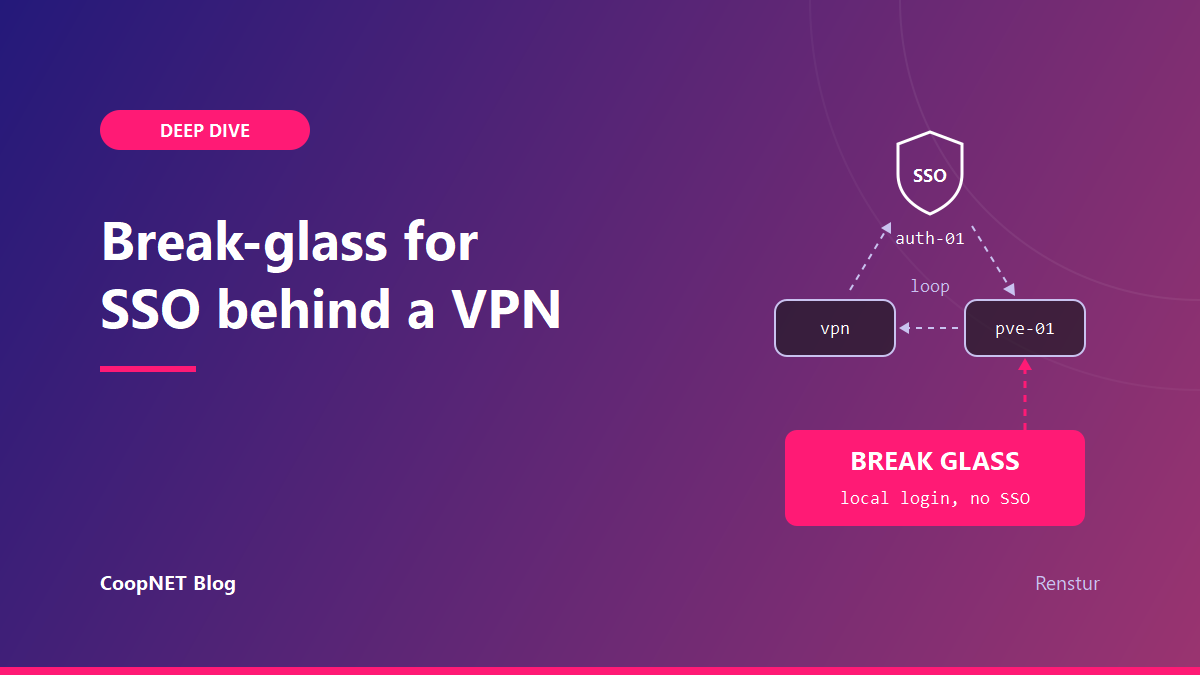
My Authentik instance, the mail relay that sends its recovery emails, and my password manager all run on the same VM. NetBird, the overlay that gates my private apps, signs users in through that same Authentik. Draw the arrows on paper and they make a circle.
On a normal day the circle doesn't matter. The day the VM is down, it's the only thing that does.
The loop, drawn out
Authentik is the OIDC login for about a dozen apps, and two of them are Proxmox and NetBird. Private apps aren't published at all. You reach them over NetBird, and only if your device is in the right group. I chose that on purpose over an Authentik proxy, and I'd choose it again.
Follow a bad night through. The VM stops, and Authentik goes with it, so no OIDC login works anywhere. Password recovery goes by email through the relay on that VM, so recovery is gone too. The password manager holding the credentials I'd reach for is on the same VM.
And the hypervisor running that VM signs in through Authentik as well.
My position after staring at that: if the login system depends on the VPN, and the VPN depends on the login system, you need a way in that depends on neither. Every piece of the break glass path should still work with the SSO VM switched off.
Which NetBird peers actually need the SSO
The VPN half of the loop is smaller than it looks. The NetBird docs (updated August 2026) say exactly where it sits.
NetBird enrolls a peer one of two ways. A user device signs in with interactive SSO. A server is usually enrolled with a setup key, which is a token you make ahead of time and pass to netbird up:
netbird up --setup-key <setup-key>
Peer session expiration only applies to peers added with SSO login. Peers enrolled with a setup key aren't affected. When an SSO peer's session runs out it shows as Login required, and it stays off the mesh until someone signs in again.
My servers all joined with setup keys. My laptop, phone and desktop joined through SSO. So with the SSO VM down, the server mesh keeps running. What breaks is my own device, the moment its session expires. It can't sign back in, because the thing it signs in against is the thing that's down.
Two settings decide how fast that happens. The first is the expiration period itself: the docs allow one hour to 180 days, and new accounts start at 24 hours. Mine is set long. The second is "Require login after disconnect", which makes an SSO peer that's been away from management for 10 minutes sign in again. That one I'd leave off on any device I'd need during an outage.
A short session is good security right up until the identity provider is what broke.
The DNS outage I already paid for
VPN dependencies also creep in sideways. In October 2026 my Windows desktop lost its internet for an afternoon, and the router wasn't the cause.
A NetBird nameserver group was set as primary for every device, with no match domains. That made the desktop send every lookup, public names included, through the local NetBird resolver. The client updated itself, the service crashed and got reinstalled, and name resolution went down with it.
I scoped that nameserver group to servers only. A crashed client on my desktop now breaks internal names and nothing else.
How sure I am: the update, the crash and the outage line up on the same afternoon. I didn't catch the resolver failing in the act, so the mechanism is likely rather than proven.
What my way in looks like
The hypervisor keeps its local accounts. Per the Proxmox user management docs, the root user can always log in through the Linux PAM realm. I also keep a separate administrator in Proxmox's own realm. Neither goes through Authentik.
Deleting them after adding SSO would have been tidy. It would also have removed the only door that doesn't need the VM I'm trying to fix.
Authentik has its own way back in. If a flow is broken or a stage is misconfigured, the server container can make a recovery link that only works once:
docker compose run --rm server create_recovery_key 10 <admin-user>
That prints a link that logs you in as that user, valid for the number of minutes you pass. The docs warn that whoever holds the link has access to the instance, so I treat the output like a password.
Look at what that command needs, though. A shell on the host. And a shell on the host needs a login path that doesn't run through Authentik, which leads straight back to the hypervisor's local accounts.
Then the second factor. Authentik's static authenticator stage generates backup codes, and each one is used up the first time you enter it. The authenticator validation stage accepts them once the static device class is allowed. Any admin account with a single factor should have them. Print them, and keep them somewhere that isn't the vault that just went down with the VM.
Email recovery doesn't make my list. It works, and I tested it end to end. It also leaves through a relay on the same VM, so it covers a forgotten password, not an outage.
Which half survives which failure
Location changes the picture. Home Assistant and the media stack run at home. Everything else, SSO and my house wiki included, lives in a data centre.
An internet outage at the house leaves the home services running and reachable on the LAN, while SSO and the wiki go dark. A power cut at the house is the reverse. The break glass path has to cover the data centre half, and it has to work from a device whose VPN session might already have expired.
What I'd tell myself
Write the break glass path down before you need it, and walk it with the SSO VM stopped rather than in your head. Keep the hypervisor's local logins. Keep VPN sessions on admin devices long. Keep printed backup codes somewhere that isn't the vault.
I changed the names and addresses. Everything else is how it actually went.
$ ./ask --help
Stuck on something similar? Ask below and I'll try to help you work through it. It helps to include:
- --running hardware, OS, versions
- --tried what you've already tried
- --error the exact message, word for word
Comments are public, so leave out passwords, keys and public IP addresses.