My NetBird homelab: zero open ports
How I reach Authentik, Vaultwarden, Forgejo, Checkmk, TrueNAS and Home Assistant from anywhere with NetBird, with no port forwarded on my home router for any of it.

By Renstur
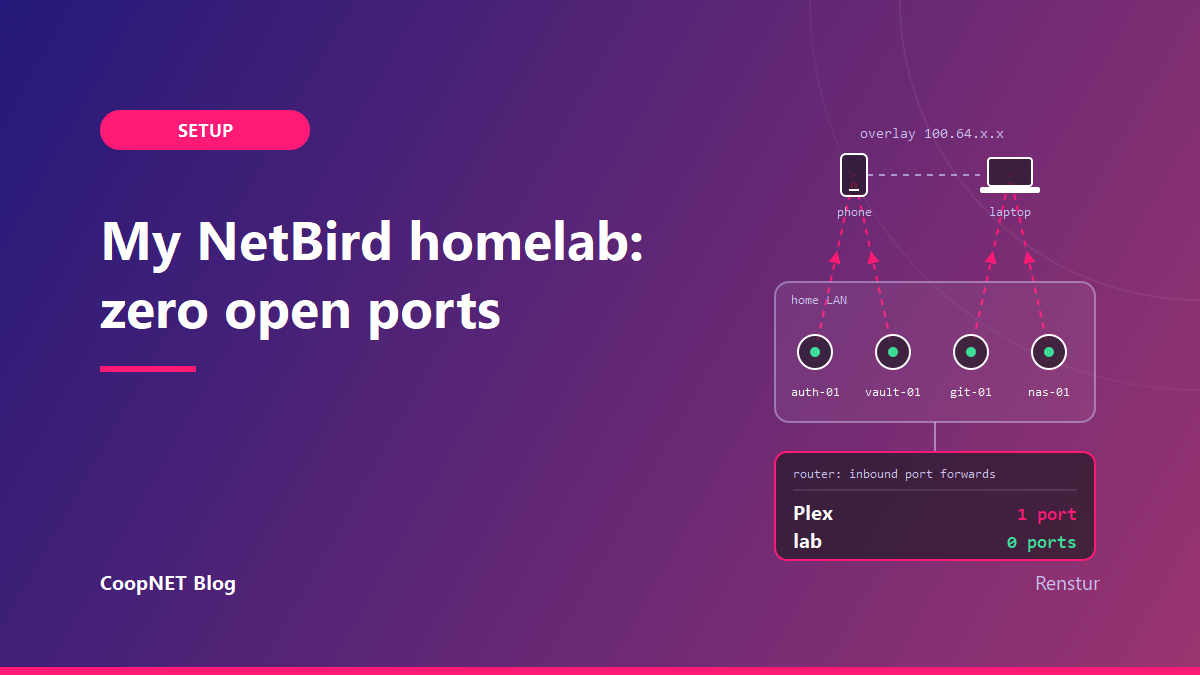
My router's port-forwarding page has exactly one rule on it, and it's for Plex. There's nothing on there for the lab.
Plex gets its exception because I found that using a my own personal relay vs. the one provided from Plex.TV seemed to have stuttered, a lot. I'm fine with that trade. Everything else stays shut.
Even so, I can open my password vault, push to my Git server, check on the NAS and turn off a light in Home Assistant from my cellular device and through my regular Google Hub devices. NetBird is what makes that work.
This post covers how it's laid out, the order I set it up in, how I write the access rules, and the mistakes that ate my evenings. When I say "zero open ports," I mean the home router, minus that one Plex rule.
What's in the lab
The names are generic, and yours won't match.
| Role | App | Placeholder peer name |
|---|---|---|
| Identity / SSO | Authentik | auth-01 |
| Password manager | Vaultwarden | vault-01 |
| Git forge | Forgejo | git-01 |
| Monitoring | Checkmk | mon-01 |
| Storage | TrueNAS | nas-01 |
| Home automation | Home Assistant | ha-01 |
I have one small dedicated PC that runs home assistant, among a few other small items. Then another PC that runs TrueNAS for a variety of my other containers, including Plex. The rest of the infrastructure is running in the cloud.
Why an overlay instead of port forwarding
The usual way to do this is to forward 443 to a reverse proxy and put everything behind it.
That works, but then your services sit on the internet. Every scanner out there gets a go at your login pages, and you're counting on each app's auth holding up for as long as you run it. You're also counting on yourself to patch quickly, every time.
An overlay network turns that around. Devices you enroll join a private, encrypted network, and those are the devices that can reach the services. My router has no forwarded port leading to any of it.
I went with NetBird for that overlay, for a few reasons. It's WireGuard underneath. Each peer builds encrypted point-to-point tunnels, and its private key is generated on the device and stays there.
The client also doesn't need an inbound port. NetBird's docs say so plainly: peers connect outbound and punch through NAT, and if a direct path won't come up, traffic falls back to a relay over 443. The relay can't decrypt it.
You get real access control instead of a flat network, too. Out of the box every peer can reach every other peer, but you can replace that with rules for exactly who reaches what. I'll get to how I do that.
And it's open source, so I run the control plane myself. I love to experiment with self-hosted applications, and NetBird has become my most favorite yet.
I originally used Tailscale for the longest time, but I have found more flexibility with NetBird. The addition of CrowdSec was also a winner for me and they continue to grow their functions frequently.
How it fits together
NetBird has four parts. It's worth knowing which one does what, because "it won't connect" means something different depending on which part is unhappy.
The client runs on each device. It generates the keys, applies firewall rules and builds the tunnels. Management is the coordinator and the dashboard: it registers peers, hands out their private addresses and pushes the policies. Signal helps two peers find each other and then gets out of the way. It never sees what they send. The relay is the fallback when a direct connection won't work, and traffic through it is still end-to-end encrypted.
Peers get addresses from the carrier-grade NAT range, 100.64.0.0/10. I'll write them as 100.64.x.x.
I get devices onto the overlay in two ways. If a machine can run the NetBird client, it gets one. It becomes a peer, and policies can point at it directly.
Some things can't run a client, like appliances, IoT gear, or a NAS you'd rather not install extra packages on. For those, one small box on the LAN runs the client and acts as a routing peer. NetBird calls the config object for this a Network. You add resources behind the routing peer (a single IP, a range or a domain), and none of them are reachable until a policy allows it.
   phone / laptop (peer)                         home LAN
   ───────────────────────                ───────────────────────
            │                             auth-01   (client)
            │  WireGuard, outbound only   vault-01  (client)
            ├────────────────────────────▶ git-01    (client)
            │                             router-01 (routing peer)
            │                               └─▶ resources on
            │                                   192.168.x.x/32
   management / signal / relay
   (coordinate and fall back only;
    can't read your traffic)

   Home router inbound rules: one, for Plex. None for the lab.
What actually happens when you open a link
Every service I publish sits behind the NetBird reverse proxy. What changes from one to the next is what the proxy does with a request before it forwards anything. There are three ways that goes.
Published: the app asks who you are
browser -> sub.domain.com -> NetBird reverse proxy -> CrowdSec check -> service -> app sign-inThis is the ordinary one. The request reaches the proxy, CrowdSec checks the caller, and if nothing flags it the page loads. From there the application handles sign-in itself. Real hostname, real certificate, and the app's own login is the gate.
Mesh-only: enrolled peer or Forbidden
on NetBird:   browser -> sub.internal.domain.com -> NetBird reverse proxy -> peer check passes -> service
not on it:    browser -> sub.internal.domain.com -> NetBird reverse proxy -> peer check fails -> Forbidden
Before it forwards anything, the proxy resolves the caller back to an enrolled NetBird peer. If it can, the page loads like any other. If it can't, the answer is a flat Forbidden. There's no login page and nothing to probe.
Someone who guesses the hostname gets one word back.
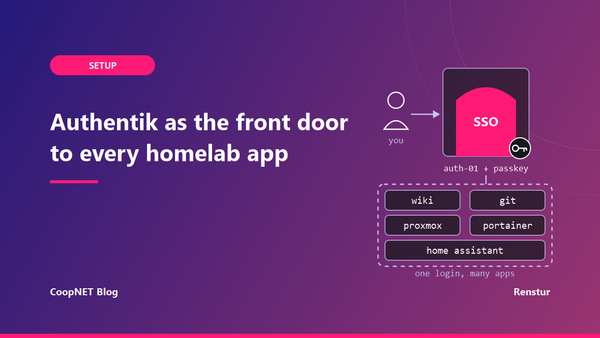
SSO: Authentik before the app
browser -> sub.domain.com -> NetBird reverse proxy -> Authentik sign-in -> group check -> serviceWhen a service's proxy auth is set to SSO, the proxy sends you to Authentik first (something like auth.domain.com). You sign in there, and your account also has to be in the right Authentik group, say media-users, before the service loads.
This is where it pays off for the *arr apps. Radarr and Sonarr don't support OIDC, only proxy header auth. Rather than passing authentication headers through to each of them, I let the proxy put an Authentik login in front. Nobody reaches the app without getting past Authentik and the group check first.
What skips the proxy entirely
A couple of things never go through it. The NAS stays on the home network, and the mail relay only answers the overlay address range (100.64.x.x). The one rule on my home router is still Plex.
Side by side
| Path | What the proxy checks | What a stranger sees |
|---|---|---|
Published (sub.domain.com) | CrowdSec, then hands off to the app | The app's own sign-in |
Mesh-only (sub.internal.domain.com) | Whether the caller is an enrolled NetBird peer | Forbidden |
SSO (sub.domain.com) | Authentik sign-in and group membership | The Authentik login |
Setting it up
This is the order I'd do it in if I started over. Install commands differ by OS and change over time, so I'm linking the official docs instead of pasting commands that'll go stale.
1. Stand up the control plane
I self-host it, which means running Management, Signal and Relay myself. NetBird Cloud skips all of that if you'd rather not run a server. The official self-hosted quickstart asks for a small Linux VM with a public domain, reachable on TCP 80 and 443 and UDP 3478.
That VM is the catch in this post's title. My home router has no forwards for the lab, but the control plane needs open ports wherever it lives. Mine runs on a dedicated server in the cloud, away from my home network. Keep that box patched and treat it as the most exposed thing you own, because it probably is.
Depending on your operating system of choice, I would recommend adding in firewall rules to only allow your public IP as a way in. If you have a dynamic IP or double NAT'd, I would lock it down to the best of your ability with SSH key only authentication. Keep it the most secure server you have.
2. Connect your identity provider
Peers can log in through an identity provider instead of only using setup keys. If you already run Authentik, making it your NetBird login is the obvious move.
Read the Authentik lockout problem in the gotchas section before you do it.
I connect in through Authentik to my NetBird control pane and the setup was really painless.
3. Enroll servers with setup keys
A headless server can't click a login button, so it enrolls with a setup key instead.
I make one key per batch of machines rather than one key that lives forever. Each key gets a short expiry and a limited number of uses, and it auto-assigns a group so new peers land in the right place. When the batch is done, I revoke it.
Treat a setup key like a password. It shouldn't end up in a screenshot, a Git repo or a blog post, this one included.
4. Enroll your own devices
Install the client on your laptop and phone and log in. These are your user peers.
5. Add a routing peer for everything else
Create a Network, choose the routing peer and add resources. I'd use single-host /32 resources over a whole subnet. NetBird's docs recommend that for least privilege, and I think they're right at home too.
6. Write your policies, then delete the default
Details are in the next section. The order matters, though. If you delete the default policy first, nothing can talk until your new policies are in place.
7. Test from outside
Turn off Wi-Fi on your phone and try each service over cellular. Then look at the router's port-forwarding page again. The only rule there should be one you meant to have (Plex, in my case), and nothing for the lab.
Accessing my *arr suite was a real game changer when I could access everything outside, rather than having to be on NetBird or having any sort of firewall rules.
How I write access policies
Every NetBird account starts with a policy called Default, with the built-in All group as both source and destination. That's a full mesh where every peer can reach every peer. It's fine for the first day and not somewhere to stay.
A few things about how policies behave, from the docs. They only allow traffic. There are no deny rules and no ordering, so if nothing matches, nothing flows. A policy can be bidirectional or unidirectional, and unidirectional (only the source can start a connection) is the shape you usually want. Resources behind a routing peer aren't in the All group, so a resource with no policy can't be reached by anyone.
What follows is the shape of my rules. It isn't my actual rule list.
I group by role instead of by machine, with groups like admins-devices, family-devices, servers-core, servers-apps and monitoring. A peer can be in more than one.
People reach apps, and apps don't reach people. User-device groups are the source and server groups are the destination, one direction only. If a server gets compromised, it shouldn't be able to open a connection to my laptop.
Using something and administering it get separate policies. Family devices might need the password manager and Home Assistant on their web ports and nothing else, while admin devices get that plus SSH and the management UIs. Either way I pick the protocol and the ports the app actually listens on. Picking "All" is quicker, and it quietly undoes most of the point.
Monitoring gets its own lane. The monitoring host has to reach what it checks, often on agent ports, so it gets its own policy to those targets. Nobody else picks up that access by riding along.
Server-to-server rules only exist where there's a real dependency, like an app asking SSO to check a login. That pair gets a policy. The whole server group doesn't get blanket access to itself.
Once every path tests clean, I delete Default.
I ended up with around 15 policies, and ten or so more groups.
Gotchas that cost me time
The control plane is your new front door. I mentioned this in the setup, but it's worth a second pass. Self-hosting it means a public VM with open ports. The house stays closed and the exposure moves to that VM.
Authentik can lock you out of your own network. If Authentik is your NetBird login and Authentik is only reachable over NetBird, a fresh device can't log in to join the network it needs to reach the login page. Sort out a way in before you need one. The usual options are a local admin account on NetBird, a setup key kept in offline break-glass notes, or keeping the IdP reachable to the control plane some other way.
Vaultwarden can do the same thing to you. If your NetBird credentials only live in the vault, and the vault is only reachable through NetBird, you've locked the key inside the box. Keep the break-glass bits somewhere offline.
If connections are flaky, your first instinct might be to open UDP 51820 outbound. It probably won't help. NetBird's docs point out that the port a peer sends to is whatever the other side's NAT picked, and that often isn't 51820. Check whether peers have fallen back to the relay before you start opening firewall holes.
Host firewalls can still get in the way. The client manages its own rules on its interface, but UFW, firewalld or Windows Firewall can interfere, and NetBird's docs have a troubleshooting section just for this. I did not experience any of this trouble.
Peer IPs get reused right away. Delete a peer and its 100.64 address can go to the next peer immediately, with no holding period. If an app allowlists a 100.64 address, recheck it after you rebuild a machine. I'd rather lean on NetBird groups than IP allowlists anyway.
And delete Default last. I know I keep saying it.
What's next
The short version: enroll the devices you trust, give them policies for what they actually need, and don't forward a port on the home router for any of it.